


Download Movie Draft SE – Screenplay Writing Software, Free, Secure
Why Movie Draft SE Is the Go‑to Tool for Every Screenwriter
Writing a screenplay is more than just a story; it’s a disciplined craft that demands strict formatting, precise timing, and a clear visual structure. Movie Draft SE answers those demands with a modern, intuitive interface that blends the power of professional‑grade formatting with the flexibility of a digital corkboard. Whether you are a Hollywood‑bound veteran or a first‑time storyteller experimenting with dialogue, this app removes the technical roadblocks that often stall creativity. You can focus on character arcs, plot twists, and emotional beats while the software automatically applies industry‑standard margins, slug lines, and scene headings. The result is a polished, production‑ready script that looks as good on a laptop screen as it does when printed for a table read.
The key advantage of Movie Draft SE lies in its “non‑linear” workflow. By treating each scene as an “index card,” you can rearrange, duplicate, or delete sections with a simple drag‑and‑drop, mimicking the traditional storyboard method without ever leaving the digital realm. Coupled with the built‑in ScreenTime calculator, the app helps you stay within the coveted 90‑minute runtime, ensuring each scene contributes to the overall pacing. Moreover, comprehensive character and location profiles keep your world‑building consistent, preventing continuity errors that can derail a production.
In this review we’ll explore the core features, walk through the installation process, evaluate platform compatibility, and weigh the pros and cons. By the end, you’ll know exactly why Movie Draft SE deserves a spot in your writing toolkit and how to download it safely and securely.
Feature‑Rich Toolkit That Keeps Your Script Production‑Ready
- Industry‑Standard Formatting: Automatic application of screenplay conventions—slug lines, action blocks, character names, parentheticals, and dialogue—so you never have to worry about manual alignment.
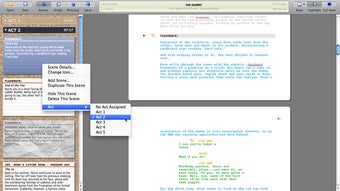
- Index‑Card Scene Management: Visual “cards” for each scene let you reorder story beats instantly, supporting both linear and non‑linear drafting styles.
- ScreenTime Calculator: Real‑time estimates of each scene’s runtime help you maintain target length and balance pacing across acts.
- Character & Location Profiles: Dedicated pages for bios, traits, and setting details keep continuity tight and make research a breeze.
- Export Options: Export to PDF, Final Draft (.fdx), Fountain, and plain text, ensuring compatibility with industry partners and submission portals.
- Collaboration Tools: Cloud sync and shared project links enable multiple writers to work on the same script without version conflicts.
- Revision Tracking: Built‑in version control highlights changes, making it simple to revert to earlier drafts or compare iterations.
- Customizable Templates: Pre‑loaded templates for feature films, TV pilots, short scripts, and web series let you start with the right structure.
Each of these features is designed with the writer’s workflow in mind. For instance, the Index‑Card system mirrors the traditional “beat board” used in writers’ rooms, allowing you to visualize the story arc at a glance. The ScreenTime calculator draws from an extensive database of average scene lengths, giving you a realistic sense of how long a dialogue‑heavy exchange or an action sequence will run on screen. Meanwhile, the character profiles act as a living database—once you enter a protagonist’s backstory, the app will remind you of key traits whenever you reference that character, reducing the risk of inconsistency.
Export flexibility is another strong point. Many studios still request scripts in Final Draft format; Movie Draft SE’s .fdx export ensures you meet those expectations without needing a separate conversion step. If you prefer a lightweight markup language, the Fountain export provides a clean, readable plain‑text version that can be version‑controlled via Git. This versatility makes the app suitable for both solo writers and collaborative teams that need to share drafts across different platforms.
Step‑by‑Step Installation and Seamless Daily Use
Downloading the App Securely
To begin, visit the official Movie Draft SE website or your platform’s app store. The download is free for a 30‑day trial, after which a modest one‑time license fee unlocks the full feature set. The installer is signed with a valid code‑signing certificate, guaranteeing that the package is free from malware. For Windows users, the .exe installer guides you through a typical “Next‑Next‑Finish” flow; macOS users receive a .dmg file that can be dragged into the Applications folder.
Initial Setup and Project Creation
Once installed, launch the application and create a new project from the welcome screen. You’ll be prompted to choose a template—select “Feature Film” for a standard 120‑page structure, or “TV Pilot” if you’re writing a series opener. The app automatically creates the title page, scene headings, and a placeholder index‑card deck. You can rename each card, attach notes, and set a target duration using the ScreenTime panel.
Daily Workflow Tips
Many writers adopt a “write‑first‑re‑format‑later” approach. With Movie Draft SE, you can type raw dialogue directly into a card; the software instantly formats it according to screenplay conventions. Use the “Outline” view to see all cards in a linear list, then switch to the “Corkboard” view to rearrange scenes visually. The built‑in spell‑check and grammar suggestions keep your prose polished, while the “Notes” tab lets you attach research links, images, or storyboard sketches.
When you’re ready to share a draft, click the “Export” button and choose the desired format. For collaborative teams, enable “Cloud Sync” under Settings; the app will store your project on encrypted servers, allowing teammates to pull updates in real time. Regular backups are automatically created, so you can restore a previous version with a single click if needed.
Compatibility, Strengths, Weaknesses, and Frequently Asked Questions
Platform Compatibility (Windows 10/11, macOS 10.15+, iOS 13+, Android 8+)
Movie Draft SE is truly cross‑platform. The desktop version runs natively on Windows and macOS, leveraging native UI components for smooth performance even with large projects. Mobile apps for iOS and Android keep your script synced on the go, allowing you to jot down ideas, edit scenes, or view the outline from a tablet or smartphone. All versions share the same cloud storage, so changes made on a phone instantly appear on your laptop.
Pros
- Complete adherence to industry‑standard screenplay formatting.
- Intuitive index‑card system for non‑linear storytelling.
- Accurate ScreenTime estimates that help maintain desired runtime.
- Robust export options (PDF, .fdx, Fountain, TXT).
- Cross‑device synchronization and collaboration features.
- Free trial with full functionality, low one‑time purchase price.
Cons
- Learning curve for users unfamiliar with index‑card workflows.
- No built‑in AI script analysis (requires third‑party tools for feedback).
- Mobile app UI is slightly less feature‑rich than desktop version.
FAQ – Answers From the Developers
Is Movie Draft SE truly free during the trial?
Yes, the 30‑day trial gives you unrestricted access to all premium features, including cloud sync and export options. No hidden fees appear during the trial period.
Can I import an existing script from Final Draft?
Absolutely. Movie Draft SE supports .fdx import, preserving formatting, scene numbers, and notes. After import, you can convert the script into index cards for easier re‑structuring.
How secure is the cloud synchronization?
All data is encrypted both in transit (TLS 1.3) and at rest (AES‑256). Your login credentials are stored using salted hashes, complying with GDPR and CCPA standards.
Does the app support multiple languages?
The interface is currently available in English, Spanish, and French. Script content can be written in any language, and the formatting engine remains language‑agnostic.
Can I export a script with custom fonts?
Exported PDFs retain the Courier New font required by most production houses, but you can embed custom fonts for personal use by adjusting the export settings in the Preferences menu.
Expert Review Summary
Pros: industry‑standard formatting, flexible index‑card workflow, accurate timing tools, robust export, cross‑platform sync.
Cons: initial learning curve, limited AI feedback, mobile UI slightly pared down.
Final Verdict – Should You Download Movie Draft SE?
Movie Draft SE strikes a rare balance between professional rigor and user‑friendly design. Its comprehensive formatting engine eliminates the tedious manual adjustments that plague many writers, while the visual index‑card system empowers you to experiment with story structure without fear of breaking layout. The inclusion of a ScreenTime calculator and character profiles shows that the developers truly understand the end‑to‑end needs of a screenwriter, from concept to final draft.
For newcomers, the guided templates and intuitive UI lower the barrier to entry, making the craft feel approachable. For seasoned pros, the seamless import/export workflow, cloud collaboration, and revision tracking keep the tool relevant even in a high‑volume production environment. The modest one‑time purchase after the free trial further adds value, especially when compared to subscription‑based competitors that lock essential features behind recurring fees.
If you are ready to streamline your screenplay creation process, keep your formatting compliant, and gain real‑time insight into scene length, download Movie Draft SE today. Experience the confidence that comes from writing with a tool built specifically for the demands of film and television storytelling.







